TI 84 Graphing Calculator Man.2.0.1
Publisher Description

Ranked TOP 25 Education USA!
The must-have companion for your TI-84 Plus:
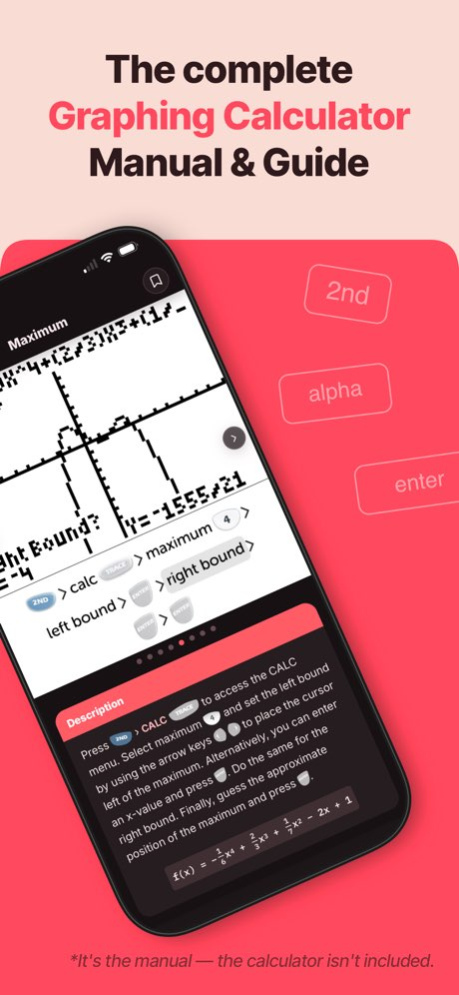
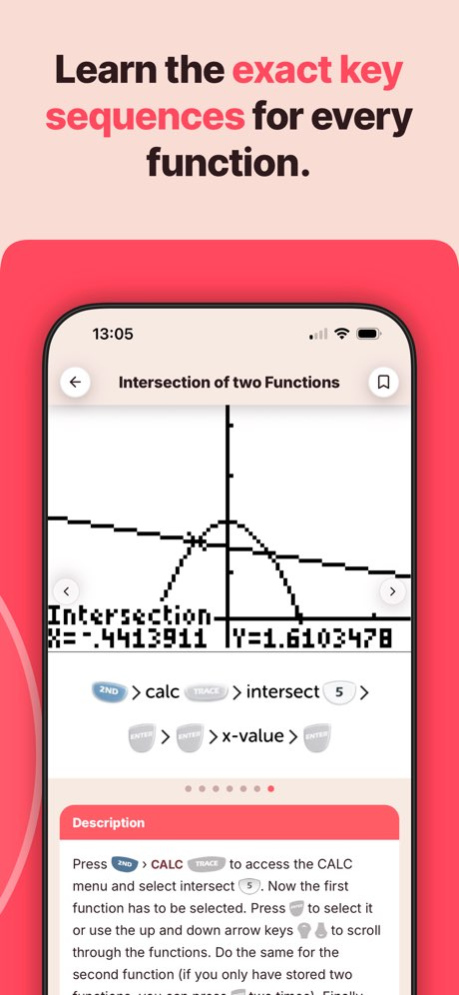
. This manual shows all the important functions of the TI-84 Plus graphing calculator you need to know for high school or college. It comes with step-by-step key press sequences and some insider tips about your calculator. In total it covers 46 topics that will transform you into a TI-84 master.
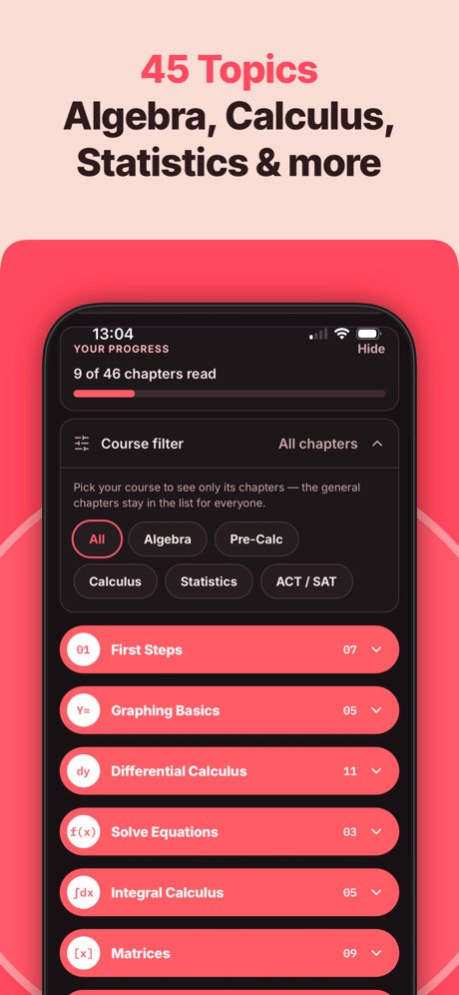
. The following chapters are available: First Steps, Graphing Basics, Differential Calculus, Solve Equations, Integral Calculus, Matrices, and Statistics & Probability.
. You can swipe through screenshots of the original graphing calculator that show every step you need to take (over 250 screenshots in total), watch animated key press sequences, or open video tutorials to see every command in action!
. 60 math problems with solutions and a quiz to practice your skills!
. Ideal for exam preparation since you often won't remember all the calculator's commands after several months. It covers all you need to know for the SAT, ACT, and AP exams.
The app contains the following topics:
FIRST STEPS
. The Basics of the Basics
. Mode Settings
. Basic Arithmetic
. Storing Variables
. Working with Fractions
. Testing Numbers
. Converting Angles & DMS
GRAPHING BASICS
. Enter Functions
. Enter Families of Functions
. Formatting the Graph
. Setting the Graph Window
. Zooming the Graph Window
DIFFERENTIAL CALCULUS
. Tracing a Graph
. Find Y-Value
. Find X-Value
. Y-Intercept
. Zeros of a Function
. Minimum
. Maximum
. Intersection of two Functions
. Draw Derivative
. Inflection Points
. Calculate Tangent
SOLVE EQUATIONS
. Polynomial
. Solve any Equation
. Equation Solver
INTEGRAL CALCULUS
. Calculate Integral
. Integral in GRAPH-Menu
. Find Area with Absolute Value
. Area between two Functions
. Integral Function
MATRICES
. Save Matrix
. Delete Matrix
. Put into Row Echelon Form
. Solve Matrix
. Determinant of a Matrix
. Transpose of a Matrix
. Identity Matrix
. Inversion of a Matrix
. Matrix Arithmetic Operations
STATISTICS & PROBABILITY
. Permutations, Combinations & Factorials
. Random Numbers
. Lists & Statistical Data
. Histogram, Box Plot & Scatter Plot
. Statistical Data Analysis
. Regression
MATH PROBLEMS & QUIZ
. Practice with 60 math problems with solutions and test yourself with the built-in quiz.
We also have manual apps for the TI-84 Plus CE, TI-Nspire CX II (and CAS), and CASIO fx-9860GII.
Looking for a calculator on your phone? Get this guide together with our graphing calculator app GraphNCalc84 in the TI 84 Manual + Graphing Calculator App Bundle. Already own this guide? Apple counts what you paid, so you only pay a few dollars more.
NO ACTUAL GRAPHING CALCULATOR INCLUDED. THE APP IS A MANUAL!
TI-84 Plus and TI-84 Plus CE are trademarks of Texas Instruments Incorporated. This app is an independently developed manual and is not affiliated with, sponsored by, or endorsed by Texas Instruments.
Version History Your TI-84 Plus Graphing Calculator manual, completely rebuilt from the ground up:
• Fresh, modern design with dark mode — same trusted 46 topics, thoroughly revised
• Authentic TI-84 Plus key caps throughout the whole manual
• Animated key press screencasts you can play right inside the chapters
• Video tutorials for the trickiest commands
• Course filter: see only the chapters for Algebra, Pre-Calc, Calculus, Statistics or ACT/SAT
• Full-text search across the whole manual
• Quiz and math practice problems to test yourself
• Track your reading progress and bookmark chapters 2.0.1 6d ago Your TI-84 Plus Graphing Calculator manual, completely rebuilt from the ground up:
• Fresh, modern design with dark mode — same trusted 46 topics, thoroughly revised
• Authentic TI-84 Plus key caps throughout the whole manual
• Animated key press screencasts you can play right inside the chapters
• Video tutorials for the trickiest commands
• Course filter: see only the chapters for Algebra, Pre-Calc, Calculus, Statistics or ACT/SAT
• Full-text search across the whole manual
• Quiz and math practice problems to test yourself
• Track your reading progress and bookmark chapters 2.0.0 Aug 25 + Updates to the descriptions of most TI 84 calculator chapters
+ Performance improvements & Bug Fixes 1.5.6 09/06/2018 + iPhone X support
+ Performance improvements & Bug Fixes
+ Updates to TI 84 chapters 1.5.5 05/24/2018 + iPhone X support
+ Performance improvements & Bug Fixes
+ Updates to TI 84 chapters 1.5.4 05/15/2018 + iPhone X support
+ Performance improvements
+ Updates to TI 84 chapters 1.5.3 05/01/2018 + iPhone X support
+ Performance improvements
+ Updates to TI 84 chapters 1.5.2 03/21/2018 Today we are excited to announce the release of the brand new version of our app. It offers a new look and feel, over 20 new topics and three whole new chapters. Many new topics come with animations of the TI 84 graphing calculator to help you understand better how to use your calculator. Furthermore, we used your great feedback to overwork all existing topics.
Here are some features we are excited about:
+ 21 new topics
+ New design to the home menu
+ Better descriptions and lots of useful tips
+ Animations of the TI 84 calculator
A full list of all the new topics:
FIRST STEPS
• The Basics of the Basics
• Mode Settings
• Basic Arithmetic
• Storing Variables
• Working with Fractions
• Testing Numbers
• Converting Angles & DMS
GRAPHING BASICS
• Enter Functions
• Enter Families of Functions
• Formatting the Graph
• Setting the Graph Window
• Zooming the Graph Window
DIFFERENTIAL CALCULUS
• Tracing a Graph
SOLVE EQUATIONS
• Equation Solver
MATRICES
• Determinant of a Matrix
• Matrix Arithmetic Operations
STATISTICS & PROBABILITY
• Permutations, Combinations & Factorials
• Random Numbers
• Lists & Statistical Data
• Histogram, Box Plot & Scatter Plot
• Statistical Data Analysis
• Regression 1.5.0 01/25/2018 + We added additional explanations and tips to all topics of the "Matrices" chapter which helps to understand it better.
+ When navigating back the app reminds the scroll position of the list and doesn't jump back to the top anymore. 1.4.8 11/28/2017 + Better performance
+ iOS 11 optimizations 1.4.7 10/17/2017 + Better performance
+ iOS 11 optimizations 1.4.6 10/12/2017 + Fixed that some users can't close the tutorial page.
+ New and clear design of the key press sequences and screenshots of the TI-84 Plus.
+ New language: Spanish.
+ App file size reduced by 50%. 1.4.5 05/26/2017 + Fixed that some users can't close the tutorial page.
+ New and clear design of the key press sequences and screenshots of the TI-84 Plus.
+ New language: Spanish.
+ App file size reduced by 50%. 1.4.4 05/10/2017 + Fixed that some users can't close the tutorial page.
+ New and clear design of the key press sequences and screenshots of the TI-84 Plus.
+ New language: Spanish.
+ App file size reduced by 50%. 1.4.3 03/30/2017 + New and clear design of the key press sequences and screenshots of the TI-84 Plus.
+ New language: Spanish.
+ App file size reduced by 50%. 1.4.2 03/22/2017 + New app user interface design.
+ Now you can practice math problems directly on the topic page. 1.4.1 02/20/2017 + New app user interface design.
+ Now you can practice math problems directly on the topic page. 1.4.0 01/16/2017 + Supports 4,7-inches and 5,5-inches screen sizes now (iPhone 6, 6S, 7) 1.3.6 10/14/2016 + Some bugs fixed. 1.3.4 03/31/2016 + Some bugs fixed. 1.3.3 03/29/2016 1.1.0 02/23/2015
About TI 84 Graphing Calculator Man.
The company that develops TI 84 Graphing Calculator Man. is Di Venisco UG (haftungsbeschrankt). The latest version released by its developer is 2.0.1.
To install TI 84 Graphing Calculator Man. on your iOS device, just click the green Continue To App button above to start the installation process. The app is listed on our website since 2026-10-06 and was downloaded 10 times. We have already checked if the download link is safe, however for your own protection we recommend that you scan the downloaded app with your antivirus. Your antivirus may detect the TI 84 Graphing Calculator Man. as malware if the download link is broken.
How to install TI 84 Graphing Calculator Man. on your iOS device:
- Click on the Continue To App button on our website. This will redirect you to the App Store.
- Once the TI 84 Graphing Calculator Man. is shown in the iTunes listing of your iOS device, you can start its download and installation. Tap on the GET button to the right of the app to start downloading it.
- If you are not logged-in the iOS appstore app, you'll be prompted for your your Apple ID and/or password.
- After TI 84 Graphing Calculator Man. is downloaded, you'll see an INSTALL button to the right. Tap on it to start the actual installation of the iOS app.
- Once installation is finished you can tap on the OPEN button to start it. Its icon will also be added to your device home screen.
Program Details
System requirements
Download information
Pricing
Version History
version 2.0.1
posted on 2026-10-06
Version History Your TI-84 Plus Graphing Calculator manual, completely rebuilt from the ground up:
• Fresh, modern design with dark mode — same trusted 46 topics, thoroughly revised
• Authentic TI-84 Plus key caps throughout the whole manual
• Animated key press screencasts you can play right inside the chapters
• Video tutorials for the trickiest commands
• Course filter: see only the chapters for Algebra, Pre-Calc, Calculus, Statistics or ACT/SAT
• Full-text search across the whole manual
• Quiz and math practice problems to test yourself
• Track your reading progress and bookmark chapters 2.0.1 6d ago Your TI-84 Plus Graphing Calculator manual, completely rebuilt from the ground up:
• Fresh, modern design with dark mode — same trusted 46 topics, thoroughly revised
• Authentic TI-84 Plus key caps throughout the whole manual
• Animated key press screencasts you can play right inside the chapters
• Video tutorials for the trickiest commands
• Course filter: see only the chapters for Algebra, Pre-Calc, Calculus, Statistics or ACT/SAT
• Full-text search across the whole manual
• Quiz and math practice problems to test yourself
• Track your reading progress and bookmark chapters 2.0.0 Aug 25 + Updates to the descriptions of most TI 84 calculator chapters
+ Performance improvements & Bug Fixes 1.5.6 09/06/2018 + iPhone X support
+ Performance improvements & Bug Fixes
+ Updates to TI 84 chapters 1.5.5 05/24/2018 + iPhone X support
+ Performance improvements & Bug Fixes
+ Updates to TI 84 chapters 1.5.4 05/15/2018 + iPhone X support
+ Performance improvements
+ Updates to TI 84 chapters 1.5.3 05/01/2018 + iPhone X support
+ Performance improvements
+ Updates to TI 84 chapters 1.5.2 03/21/2018 Today we are excited to announce the release of the brand new version of our app. It offers a new look and feel, over 20 new topics and three whole new chapters. Many new topics come with animations of the TI 84 graphing calculator to help you understand better how to use your calculator. Furthermore, we used your great feedback to overwork all existing topics.
Here are some features we are excited about:
+ 21 new topics
+ New design to the home menu
+ Better descriptions and lots of useful tips
+ Animations of the TI 84 calculator
A full list of all the new topics:
FIRST STEPS
• The Basics of the Basics
• Mode Settings
• Basic Arithmetic
• Storing Variables
• Working with Fractions
• Testing Numbers
• Converting Angles & DMS
GRAPHING BASICS
• Enter Functions
• Enter Families of Functions
• Formatting the Graph
• Setting the Graph Window
• Zooming the Graph Window
DIFFERENTIAL CALCULUS
• Tracing a Graph
SOLVE EQUATIONS
• Equation Solver
MATRICES
• Determinant of a Matrix
• Matrix Arithmetic Operations
STATISTICS & PROBABILITY
• Permutations, Combinations & Factorials
• Random Numbers
• Lists & Statistical Data
• Histogram, Box Plot & Scatter Plot
• Statistical Data Analysis
• Regression 1.5.0 01/25/2018 + We added additional explanations and tips to all topics of the "Matrices" chapter which helps to understand it better.
+ When navigating back the app reminds the scroll position of the list and doesn't jump back to the top anymore. 1.4.8 11/28/2017 + Better performance
+ iOS 11 optimizations 1.4.7 10/17/2017 + Better performance
+ iOS 11 optimizations 1.4.6 10/12/2017 + Fixed that some users can't close the tutorial page.
+ New and clear design of the key press sequences and screenshots of the TI-84 Plus.
+ New language: Spanish.
+ App file size reduced by 50%. 1.4.5 05/26/2017 + Fixed that some users can't close the tutorial page.
+ New and clear design of the key press sequences and screenshots of the TI-84 Plus.
+ New language: Spanish.
+ App file size reduced by 50%. 1.4.4 05/10/2017 + Fixed that some users can't close the tutorial page.
+ New and clear design of the key press sequences and screenshots of the TI-84 Plus.
+ New language: Spanish.
+ App file size reduced by 50%. 1.4.3 03/30/2017 + New and clear design of the key press sequences and screenshots of the TI-84 Plus.
+ New language: Spanish.
+ App file size reduced by 50%. 1.4.2 03/22/2017 + New app user interface design.
+ Now you can practice math problems directly on the topic page. 1.4.1 02/20/2017 + New app user interface design.
+ Now you can practice math problems directly on the topic page. 1.4.0 01/16/2017 + Supports 4,7-inches and 5,5-inches screen sizes now (iPhone 6, 6S, 7) 1.3.6 10/14/2016 + Some bugs fixed. 1.3.4 03/31/2016 + Some bugs fixed. 1.3.3 03/29/2016 1.1.0 02/23/2015
version 2.0.1
posted on 2026-10-03
Version History Your TI-84 Plus Graphing Calculator manual, completely rebuilt from the ground up:
• Fresh, modern design with dark mode — same trusted 46 topics, thoroughly revised
• Authentic TI-84 Plus key caps throughout the whole manual
• Animated key press screencasts you can play right inside the chapters
• Video tutorials for the trickiest commands
• Course filter: see only the chapters for Algebra, Pre-Calc, Calculus, Statistics or ACT/SAT
• Full-text search across the whole manual
• Quiz and math practice problems to test yourself
• Track your reading progress and bookmark chapters 2.0.1 2d ago Your TI-84 Plus Graphing Calculator manual, completely rebuilt from the ground up:
• Fresh, modern design with dark mode — same trusted 46 topics, thoroughly revised
• Authentic TI-84 Plus key caps throughout the whole manual
• Animated key press screencasts you can play right inside the chapters
• Video tutorials for the trickiest commands
• Course filter: see only the chapters for Algebra, Pre-Calc, Calculus, Statistics or ACT/SAT
• Full-text search across the whole manual
• Quiz and math practice problems to test yourself
• Track your reading progress and bookmark chapters 2.0.0 Aug 25 + Updates to the descriptions of most TI 84 calculator chapters
+ Performance improvements & Bug Fixes 1.5.6 09/06/2018 + iPhone X support
+ Performance improvements & Bug Fixes
+ Updates to TI 84 chapters 1.5.5 05/24/2018 + iPhone X support
+ Performance improvements & Bug Fixes
+ Updates to TI 84 chapters 1.5.4 05/15/2018 + iPhone X support
+ Performance improvements
+ Updates to TI 84 chapters 1.5.3 05/01/2018 + iPhone X support
+ Performance improvements
+ Updates to TI 84 chapters 1.5.2 03/21/2018 Today we are excited to announce the release of the brand new version of our app. It offers a new look and feel, over 20 new topics and three whole new chapters. Many new topics come with animations of the TI 84 graphing calculator to help you understand better how to use your calculator. Furthermore, we used your great feedback to overwork all existing topics.
Here are some features we are excited about:
+ 21 new topics
+ New design to the home menu
+ Better descriptions and lots of useful tips
+ Animations of the TI 84 calculator
A full list of all the new topics:
FIRST STEPS
• The Basics of the Basics
• Mode Settings
• Basic Arithmetic
• Storing Variables
• Working with Fractions
• Testing Numbers
• Converting Angles & DMS
GRAPHING BASICS
• Enter Functions
• Enter Families of Functions
• Formatting the Graph
• Setting the Graph Window
• Zooming the Graph Window
DIFFERENTIAL CALCULUS
• Tracing a Graph
SOLVE EQUATIONS
• Equation Solver
MATRICES
• Determinant of a Matrix
• Matrix Arithmetic Operations
STATISTICS & PROBABILITY
• Permutations, Combinations & Factorials
• Random Numbers
• Lists & Statistical Data
• Histogram, Box Plot & Scatter Plot
• Statistical Data Analysis
• Regression 1.5.0 01/25/2018 + We added additional explanations and tips to all topics of the "Matrices" chapter which helps to understand it better.
+ When navigating back the app reminds the scroll position of the list and doesn't jump back to the top anymore. 1.4.8 11/28/2017 + Better performance
+ iOS 11 optimizations 1.4.7 10/17/2017 + Better performance
+ iOS 11 optimizations 1.4.6 10/12/2017 + Fixed that some users can't close the tutorial page.
+ New and clear design of the key press sequences and screenshots of the TI-84 Plus.
+ New language: Spanish.
+ App file size reduced by 50%. 1.4.5 05/26/2017 + Fixed that some users can't close the tutorial page.
+ New and clear design of the key press sequences and screenshots of the TI-84 Plus.
+ New language: Spanish.
+ App file size reduced by 50%. 1.4.4 05/10/2017 + Fixed that some users can't close the tutorial page.
+ New and clear design of the key press sequences and screenshots of the TI-84 Plus.
+ New language: Spanish.
+ App file size reduced by 50%. 1.4.3 03/30/2017 + New and clear design of the key press sequences and screenshots of the TI-84 Plus.
+ New language: Spanish.
+ App file size reduced by 50%. 1.4.2 03/22/2017 + New app user interface design.
+ Now you can practice math problems directly on the topic page. 1.4.1 02/20/2017 + New app user interface design.
+ Now you can practice math problems directly on the topic page. 1.4.0 01/16/2017 + Supports 4,7-inches and 5,5-inches screen sizes now (iPhone 6, 6S, 7) 1.3.6 10/14/2016 + Some bugs fixed. 1.3.4 03/31/2016 + Some bugs fixed. 1.3.3 03/29/2016 1.1.0 02/23/2015
version 2.0.0
posted on 2026-09-26
Version History Your TI-84 Plus Graphing Calculator manual, completely rebuilt from the ground up:
• Fresh, modern design with dark mode — same trusted 46 topics, thoroughly revised
• Authentic TI-84 Plus key caps throughout the whole manual
• Animated key press screencasts you can play right inside the chapters
• Video tutorials for the trickiest commands
• Course filter: see only the chapters for Algebra, Pre-Calc, Calculus, Statistics or ACT/SAT
• Full-text search across the whole manual
• Quiz and math practice problems to test yourself
• Track your reading progress and bookmark chapters 2.0.0 Aug 25 + Updates to the descriptions of most TI 84 calculator chapters
+ Performance improvements & Bug Fixes 1.5.6 09/06/2018 + iPhone X support
+ Performance improvements & Bug Fixes
+ Updates to TI 84 chapters 1.5.5 05/24/2018 + iPhone X support
+ Performance improvements & Bug Fixes
+ Updates to TI 84 chapters 1.5.4 05/15/2018 + iPhone X support
+ Performance improvements
+ Updates to TI 84 chapters 1.5.3 05/01/2018 + iPhone X support
+ Performance improvements
+ Updates to TI 84 chapters 1.5.2 03/21/2018 Today we are excited to announce the release of the brand new version of our app. It offers a new look and feel, over 20 new topics and three whole new chapters. Many new topics come with animations of the TI 84 graphing calculator to help you understand better how to use your calculator. Furthermore, we used your great feedback to overwork all existing topics.
Here are some features we are excited about:
+ 21 new topics
+ New design to the home menu
+ Better descriptions and lots of useful tips
+ Animations of the TI 84 calculator
A full list of all the new topics:
FIRST STEPS
• The Basics of the Basics
• Mode Settings
• Basic Arithmetic
• Storing Variables
• Working with Fractions
• Testing Numbers
• Converting Angles & DMS
GRAPHING BASICS
• Enter Functions
• Enter Families of Functions
• Formatting the Graph
• Setting the Graph Window
• Zooming the Graph Window
DIFFERENTIAL CALCULUS
• Tracing a Graph
SOLVE EQUATIONS
• Equation Solver
MATRICES
• Determinant of a Matrix
• Matrix Arithmetic Operations
STATISTICS & PROBABILITY
• Permutations, Combinations & Factorials
• Random Numbers
• Lists & Statistical Data
• Histogram, Box Plot & Scatter Plot
• Statistical Data Analysis
• Regression 1.5.0 01/25/2018 + We added additional explanations and tips to all topics of the "Matrices" chapter which helps to understand it better.
+ When navigating back the app reminds the scroll position of the list and doesn't jump back to the top anymore. 1.4.8 11/28/2017 + Better performance
+ iOS 11 optimizations 1.4.7 10/17/2017 + Better performance
+ iOS 11 optimizations 1.4.6 10/12/2017 + Fixed that some users can't close the tutorial page.
+ New and clear design of the key press sequences and screenshots of the TI-84 Plus.
+ New language: Spanish.
+ App file size reduced by 50%. 1.4.5 05/26/2017 + Fixed that some users can't close the tutorial page.
+ New and clear design of the key press sequences and screenshots of the TI-84 Plus.
+ New language: Spanish.
+ App file size reduced by 50%. 1.4.4 05/10/2017 + Fixed that some users can't close the tutorial page.
+ New and clear design of the key press sequences and screenshots of the TI-84 Plus.
+ New language: Spanish.
+ App file size reduced by 50%. 1.4.3 03/30/2017 + New and clear design of the key press sequences and screenshots of the TI-84 Plus.
+ New language: Spanish.
+ App file size reduced by 50%. 1.4.2 03/22/2017 + New app user interface design.
+ Now you can practice math problems directly on the topic page. 1.4.1 02/20/2017 + New app user interface design.
+ Now you can practice math problems directly on the topic page. 1.4.0 01/16/2017 + Supports 4,7-inches and 5,5-inches screen sizes now (iPhone 6, 6S, 7) 1.3.6 10/14/2016 + Some bugs fixed. 1.3.4 03/31/2016 + Some bugs fixed. 1.3.3 03/29/2016 1.1.0 02/23/2015
version 2.0.0
posted on 2026-09-05
Version History Your TI-84 Plus Graphing Calculator manual, completely rebuilt from the ground up:
• Fresh, modern design with dark mode — same trusted 46 topics, thoroughly revised
• Authentic TI-84 Plus key caps throughout the whole manual
• Animated key press screencasts you can play right inside the chapters
• Video tutorials for the trickiest commands
• Course filter: see only the chapters for Algebra, Pre-Calc, Calculus, Statistics or ACT/SAT
• Full-text search across the whole manual
• Quiz and math practice problems to test yourself
• Track your reading progress and bookmark chapters 2.0.0 Aug 25 This app has been updated by Apple to prepare for watchOS 27 compatibility. No new features are included.
+ Updates to the descriptions of most TI 84 calculator chapters
+ Performance improvements & Bug Fixes 1.5.6 09/06/2018 + iPhone X support
+ Performance improvements & Bug Fixes
+ Updates to TI 84 chapters 1.5.5 05/24/2018 + iPhone X support
+ Performance improvements & Bug Fixes
+ Updates to TI 84 chapters 1.5.4 05/15/2018 + iPhone X support
+ Performance improvements
+ Updates to TI 84 chapters 1.5.3 05/01/2018 + iPhone X support
+ Performance improvements
+ Updates to TI 84 chapters 1.5.2 03/21/2018 Today we are excited to announce the release of the brand new version of our app. It offers a new look and feel, over 20 new topics and three whole new chapters. Many new topics come with animations of the TI 84 graphing calculator to help you understand better how to use your calculator. Furthermore, we used your great feedback to overwork all existing topics.
Here are some features we are excited about:
+ 21 new topics
+ New design to the home menu
+ Better descriptions and lots of useful tips
+ Animations of the TI 84 calculator
A full list of all the new topics:
FIRST STEPS
• The Basics of the Basics
• Mode Settings
• Basic Arithmetic
• Storing Variables
• Working with Fractions
• Testing Numbers
• Converting Angles & DMS
GRAPHING BASICS
• Enter Functions
• Enter Families of Functions
• Formatting the Graph
• Setting the Graph Window
• Zooming the Graph Window
DIFFERENTIAL CALCULUS
• Tracing a Graph
SOLVE EQUATIONS
• Equation Solver
MATRICES
• Determinant of a Matrix
• Matrix Arithmetic Operations
STATISTICS & PROBABILITY
• Permutations, Combinations & Factorials
• Random Numbers
• Lists & Statistical Data
• Histogram, Box Plot & Scatter Plot
• Statistical Data Analysis
• Regression 1.5.0 01/25/2018 + We added additional explanations and tips to all topics of the "Matrices" chapter which helps to understand it better.
+ When navigating back the app reminds the scroll position of the list and doesn't jump back to the top anymore. 1.4.8 11/28/2017 + Better performance
+ iOS 11 optimizations 1.4.7 10/17/2017 + Better performance
+ iOS 11 optimizations 1.4.6 10/12/2017 + Fixed that some users can't close the tutorial page.
+ New and clear design of the key press sequences and screenshots of the TI-84 Plus.
+ New language: Spanish.
+ App file size reduced by 50%. 1.4.5 05/26/2017 + Fixed that some users can't close the tutorial page.
+ New and clear design of the key press sequences and screenshots of the TI-84 Plus.
+ New language: Spanish.
+ App file size reduced by 50%. 1.4.4 05/10/2017 + Fixed that some users can't close the tutorial page.
+ New and clear design of the key press sequences and screenshots of the TI-84 Plus.
+ New language: Spanish.
+ App file size reduced by 50%. 1.4.3 03/30/2017 + New and clear design of the key press sequences and screenshots of the TI-84 Plus.
+ New language: Spanish.
+ App file size reduced by 50%. 1.4.2 03/22/2017 + New app user interface design.
+ Now you can practice math problems directly on the topic page. 1.4.1 02/20/2017 + New app user interface design.
+ Now you can practice math problems directly on the topic page. 1.4.0 01/16/2017 + Supports 4,7-inches and 5,5-inches screen sizes now (iPhone 6, 6S, 7) 1.3.6 10/14/2016 + Some bugs fixed. 1.3.4 03/31/2016 + Some bugs fixed. 1.3.3 03/29/2016 1.1.0 02/23/2015
version 2.0.0
posted on 2026-08-28
Version History Your TI-84 Plus Graphing Calculator manual, completely rebuilt from the ground up:
• Fresh, modern design with dark mode — same trusted 46 topics, thoroughly revised
• Authentic TI-84 Plus key caps throughout the whole manual
• Animated key press screencasts you can play right inside the chapters
• Video tutorials for the trickiest commands
• Course filter: see only the chapters for Algebra, Pre-Calc, Calculus, Statistics or ACT/SAT
• Full-text search across the whole manual
• Quiz and math practice problems to test yourself
• Track your reading progress and bookmark chapters 2.0.0 2d ago This app has been updated by Apple to prepare for watchOS 27 compatibility. No new features are included.
+ Updates to the descriptions of most TI 84 calculator chapters
+ Performance improvements & Bug Fixes 1.5.6 09/06/2018 + iPhone X support
+ Performance improvements & Bug Fixes
+ Updates to TI 84 chapters 1.5.5 05/24/2018 + iPhone X support
+ Performance improvements & Bug Fixes
+ Updates to TI 84 chapters 1.5.4 05/15/2018 + iPhone X support
+ Performance improvements
+ Updates to TI 84 chapters 1.5.3 05/01/2018 + iPhone X support
+ Performance improvements
+ Updates to TI 84 chapters 1.5.2 03/21/2018 Today we are excited to announce the release of the brand new version of our app. It offers a new look and feel, over 20 new topics and three whole new chapters. Many new topics come with animations of the TI 84 graphing calculator to help you understand better how to use your calculator. Furthermore, we used your great feedback to overwork all existing topics.
Here are some features we are excited about:
+ 21 new topics
+ New design to the home menu
+ Better descriptions and lots of useful tips
+ Animations of the TI 84 calculator
A full list of all the new topics:
FIRST STEPS
• The Basics of the Basics
• Mode Settings
• Basic Arithmetic
• Storing Variables
• Working with Fractions
• Testing Numbers
• Converting Angles & DMS
GRAPHING BASICS
• Enter Functions
• Enter Families of Functions
• Formatting the Graph
• Setting the Graph Window
• Zooming the Graph Window
DIFFERENTIAL CALCULUS
• Tracing a Graph
SOLVE EQUATIONS
• Equation Solver
MATRICES
• Determinant of a Matrix
• Matrix Arithmetic Operations
STATISTICS & PROBABILITY
• Permutations, Combinations & Factorials
• Random Numbers
• Lists & Statistical Data
• Histogram, Box Plot & Scatter Plot
• Statistical Data Analysis
• Regression 1.5.0 01/25/2018 + We added additional explanations and tips to all topics of the "Matrices" chapter which helps to understand it better.
+ When navigating back the app reminds the scroll position of the list and doesn't jump back to the top anymore. 1.4.8 11/28/2017 + Better performance
+ iOS 11 optimizations 1.4.7 10/17/2017 + Better performance
+ iOS 11 optimizations 1.4.6 10/12/2017 + Fixed that some users can't close the tutorial page.
+ New and clear design of the key press sequences and screenshots of the TI-84 Plus.
+ New language: Spanish.
+ App file size reduced by 50%. 1.4.5 05/26/2017 + Fixed that some users can't close the tutorial page.
+ New and clear design of the key press sequences and screenshots of the TI-84 Plus.
+ New language: Spanish.
+ App file size reduced by 50%. 1.4.4 05/10/2017 + Fixed that some users can't close the tutorial page.
+ New and clear design of the key press sequences and screenshots of the TI-84 Plus.
+ New language: Spanish.
+ App file size reduced by 50%. 1.4.3 03/30/2017 + New and clear design of the key press sequences and screenshots of the TI-84 Plus.
+ New language: Spanish.
+ App file size reduced by 50%. 1.4.2 03/22/2017 + New app user interface design.
+ Now you can practice math problems directly on the topic page. 1.4.1 02/20/2017 + New app user interface design.
+ Now you can practice math problems directly on the topic page. 1.4.0 01/16/2017 + Supports 4,7-inches and 5,5-inches screen sizes now (iPhone 6, 6S, 7) 1.3.6 10/14/2016 + Some bugs fixed. 1.3.4 03/31/2016 + Some bugs fixed. 1.3.3 03/29/2016 1.1.0 02/23/2015
version 1.5.6
posted on 2026-08-08
Version History This update from Apple will improve the functionality of this app. No new features are included.
+ Updates to the descriptions of most TI 84 calculator chapters
+ Performance improvements & Bug Fixes 1.5.6 09/06/2018 + iPhone X support
+ Performance improvements & Bug Fixes
+ Updates to TI 84 chapters 1.5.5 05/24/2018 + iPhone X support
+ Performance improvements & Bug Fixes
+ Updates to TI 84 chapters 1.5.4 05/15/2018 + iPhone X support
+ Performance improvements
+ Updates to TI 84 chapters 1.5.3 05/01/2018 + iPhone X support
+ Performance improvements
+ Updates to TI 84 chapters 1.5.2 03/21/2018 Today we are excited to announce the release of the brand new version of our app. It offers a new look and feel, over 20 new topics and three whole new chapters. Many new topics come with animations of the TI 84 graphing calculator to help you understand better how to use your calculator. Furthermore, we used your great feedback to overwork all existing topics.
Here are some features we are excited about:
+ 21 new topics
+ New design to the home menu
+ Better descriptions and lots of useful tips
+ Animations of the TI 84 calculator
A full list of all the new topics:
FIRST STEPS
• The Basics of the Basics
• Mode Settings
• Basic Arithmetic
• Storing Variables
• Working with Fractions
• Testing Numbers
• Converting Angles & DMS
GRAPHING BASICS
• Enter Functions
• Enter Families of Functions
• Formatting the Graph
• Setting the Graph Window
• Zooming the Graph Window
DIFFERENTIAL CALCULUS
• Tracing a Graph
SOLVE EQUATIONS
• Equation Solver
MATRICES
• Determinant of a Matrix
• Matrix Arithmetic Operations
STATISTICS & PROBABILITY
• Permutations, Combinations & Factorials
• Random Numbers
• Lists & Statistical Data
• Histogram, Box Plot & Scatter Plot
• Statistical Data Analysis
• Regression 1.5.0 01/25/2018 + We added additional explanations and tips to all topics of the "Matrices" chapter which helps to understand it better.
+ When navigating back the app reminds the scroll position of the list and doesn't jump back to the top anymore. 1.4.8 11/28/2017 + Better performance
+ iOS 11 optimizations 1.4.7 10/17/2017 + Better performance
+ iOS 11 optimizations 1.4.6 10/12/2017 + Fixed that some users can't close the tutorial page.
+ New and clear design of the key press sequences and screenshots of the TI-84 Plus.
+ New language: Spanish.
+ App file size reduced by 50%. 1.4.5 05/26/2017 + Fixed that some users can't close the tutorial page.
+ New and clear design of the key press sequences and screenshots of the TI-84 Plus.
+ New language: Spanish.
+ App file size reduced by 50%. 1.4.4 05/10/2017 + Fixed that some users can't close the tutorial page.
+ New and clear design of the key press sequences and screenshots of the TI-84 Plus.
+ New language: Spanish.
+ App file size reduced by 50%. 1.4.3 03/30/2017 + New and clear design of the key press sequences and screenshots of the TI-84 Plus.
+ New language: Spanish.
+ App file size reduced by 50%. 1.4.2 03/22/2017 + New app user interface design.
+ Now you can practice math problems directly on the topic page. 1.4.1 02/20/2017 + New app user interface design.
+ Now you can practice math problems directly on the topic page. 1.4.0 01/16/2017 + Supports 4,7-inches and 5,5-inches screen sizes now (iPhone 6, 6S, 7) 1.3.6 10/14/2016 + Some bugs fixed. 1.3.4 03/31/2016 + Some bugs fixed. 1.3.3 03/29/2016 1.1.0 02/23/2015
version 1.5.6
posted on 2018-09-06
Sep 6, 2018
Version 1.5.6
This app has been updated by Apple to display the Apple Watch app icon.
+ Updates to the descriptions of most TI 84 calculator chapters
+ Performance improvements & Bug Fixes
version 1.5.6
posted on 2018-09-06
Sep 6, 2018 Version 1.5.6
+ Updates to the descriptions of most TI 84 calculator chapters
+ Performance improvements & Bug Fixes
version 1.5.6
posted on 2018-09-06
Sep 6, 2018 Version 1.5.6
This app has been updated by Apple to use the latest Apple signing certificate.
+ Updates to the descriptions of most TI 84 calculator chapters
+ Performance improvements & Bug Fixes
version 1.5.6
posted on 2018-09-06
This app has been updated by Apple to display the Apple Watch app icon.
+ Updates to the descriptions of most TI 84 calculator chapters
+ Performance improvements & Bug Fixes
